

Putting the Human Back at the Center of the Digital Landscape of the Industry:
REX from the fiel
In other words, there is a special kind of industrial comedy in watching a highly advanced digital system meet a pair of safety gloves!
Masha GUERMONPREZ & Dr. André JOLY, SPIX industry – June 2026
masha.guermonprez@spix-industry.com & andre.joly@spix-industry.com
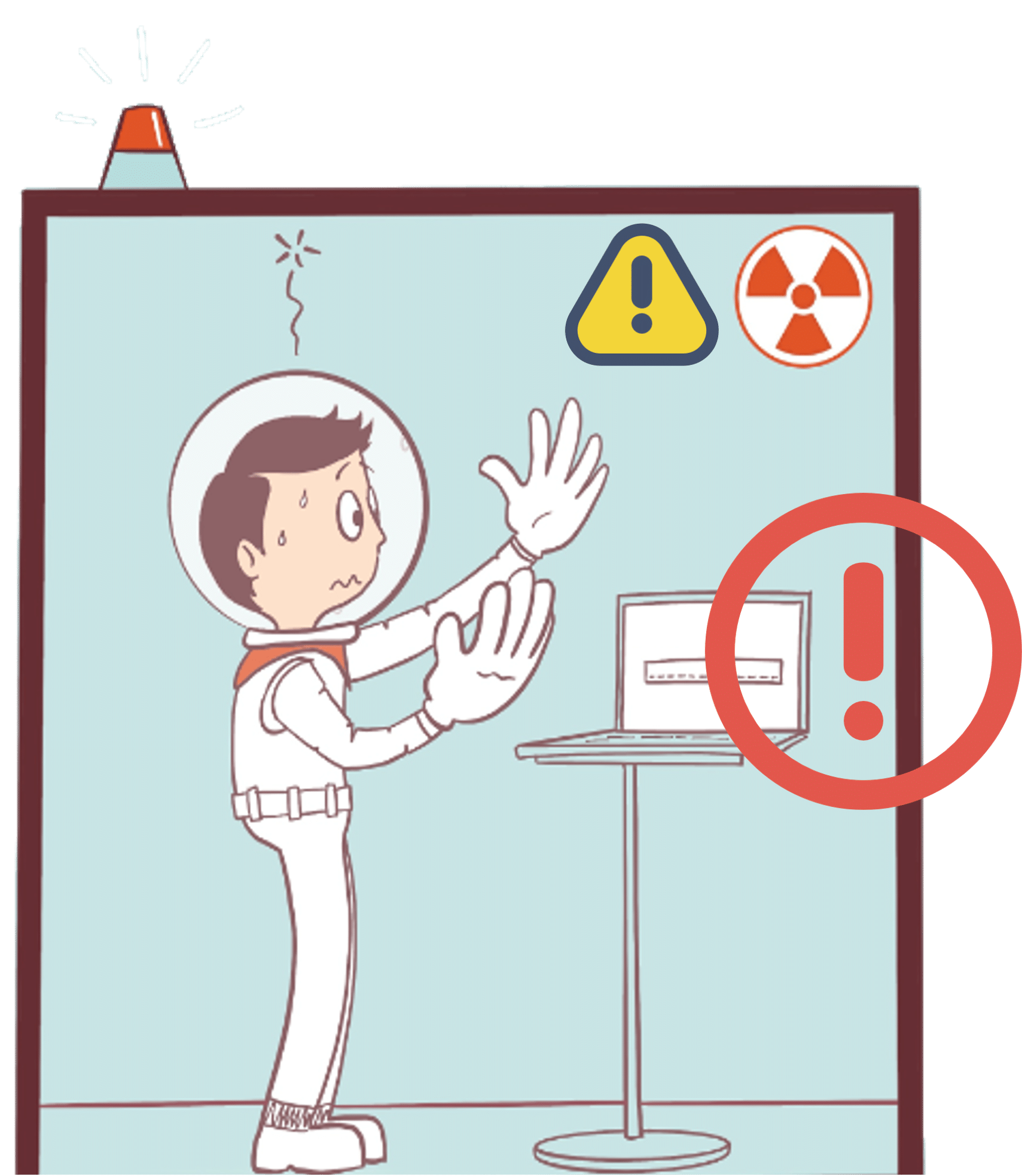
There is a special kind of industrial comedy in watching a highly advanced digital system meet a pair of safety gloves.
The software has been specified, thoroughly validated, integrated, demonstrated, commented on in steering committees, and probably celebrated in a roadmap slide with a pie chart. Then reality hits and it is wearing safety gloves, standing in a noisy zone, trying not to drop a tool, lose concentration, break procedure, or remove protective equipment just to tap a microscopic checkbox.
Digital tools look very clever in meeting rooms, but field work, sadly for PowerPoint, is quite a different reality.
In nuclear decommissioning, nobody seriously argues against digitalization. We now have robotics, artificial intelligence, 3D models and connected systems all over the place and increasingly discussed as part of the future of decommissioning, especially because these environments involve hazardous areas and a strong need for reliable operational data. The IAEA[1] has launched work on innovative digital technologies for decommissioning, including robotics and digital tools for planning, management and dismantling activities.
That movement is necessary, but it is also very incomplete with the operator being treated as an afterthought.
And it is not the lack if ambition we’re blaming here. Everyone can agree that planning better is good. Capturing field data? Good. Improving traceability? More than good in a nuclear context. However, the mess begins when a digital system assumes that the person in the field has the same working conditions as the person who designed the interface.
One has a drill; the other one has a coffee mug.
Between these two worlds lives the real question: can industrial digital tools actually fit the conditions of industrial work?
Because “putting the human back at the center” does not mean writing yet another solemn paragraph about human values and transformation. It means looking at the exact moment where an operator tries to interact with a digital system and asking a rude little question: does this tool make the job easier, or did we just move office work to a shopfloor?
When digital equipment becomes too inconvenient during the intervention, what happens it that the operators may prepare procedures in advance, rely on memory during the task, then generate reports afterwards. And that what happens all the time without people finding it problematic.
But there is a problem here and the one key word you’ve missed is “afterwards”.
A report written afterwards is not necessarily wrong, but it is already one step away from the moment it describes. The operator is tired. Memory starts tidying things up in the brain. Details that seemed obvious ten minutes earlier become vague, especially when the intervention demanded physical attention and situational awareness at the same time.
Nobody needs to be negligent for information to degrade: human beings are simply not perfect recording devices with boots.
This is where human factors stop being a passing phrase in a project document and becomes the center of the system. Human-centered design, as described by NIST through ISO 9241-210[2], aims to make interactive systems usable and useful by focusing on users, their needs and their requirements, while applying human factors, ergonomics and usability knowledge to improve effectiveness, efficiency, well-being, satisfaction, accessibility and safety.
In less institutional language: the digital tool should adapt to the work before asking the worker to adapt to the digital tool.
This sounds so obvious, and that is probably why it gets forgotten so often.
REX 01: The glove is part of the interface
A tablet looks neutral until someone tries to use it with protective gloves.
On paper, the operator only must check a box, add a comment, scan a reference or confirm a step. In real conditions, the gesture may require stopping the task, changing posture, unlocking and stabilizing the device, repeating the action because the touch input failed, and sometimes removing or adjusting gloves. The loss is not only time – but attention is also displaced from the work environment to the device.
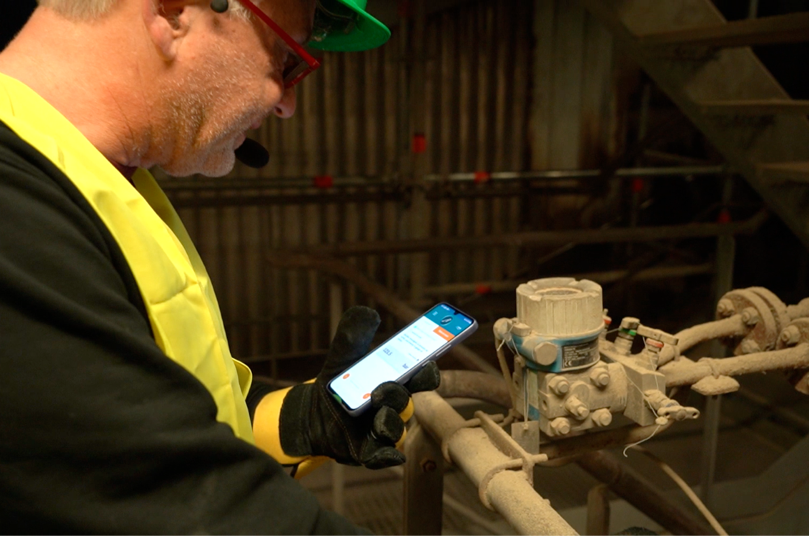
Worker controlling pumps pressures in chemical industry: gloves are mandatory (image: SPIX industry).
Would the solution be to buy bigger tablets and hope for spiritual alignment between operator and touchscreen? Not really. The better design move is to reduce the number of moments where hands are required at all.For a voice assistant, this means designing NoTouch interaction around the actual sequence of work: open procedure, validate step, dictate observation, confirm value, flag anomaly, move forward.
Where does the digital system steal the operator’s hands? Which steps require manual interaction without adding human value? Which confirmations could be spoken? Which data fields could be captured by guided dialogue instead of typed input?
Instead of the “number of digital forms deployed” a better KPI would be: number of screen interactions removed during the intervention, especially during critical phases of the task.
Industrial technology has a strange habit of becoming theatrical. The vocabulary gets large and the diagrams become increasingly intimidating (while becoming less and less understandable). Somewhere between “digital twin,” “operational AI,” “data lake” and “interoperable ecosystem,” the operator begins to shrink into a little icon wearing a helmet.
However, reducing an operator to a helmet wearing floating head is to miss out on the realities of what operators actually do: they move, listen, inspect, verify, manipulate, communicate and adjust.
They also deal with noise, access constraints, procedural obligations, physical fatigue and equipment that must remain protective. Asking them to become data-entry clerks in the middle of that is not a sign of digital maturity.
Voice assistance becomes interesting precisely because it attacks this exact point of friction.
Not in the domestic-assistant sense, where a cheerful black box keeps on continuously misunderstanding the name of a song you want to play. Industrial voice assistance has a different job. It must understand professional vocabulary, guide structured interaction, support procedure execution, help complete reports, and work under conditions that are far from a kitchen counter.
SPIX Industry positions its Smart Voice Assistant in this space: a voice-first tool allowing field operators to complete forms and checklists by voice, hands-free and offline, including no-cloud or flight-mode contexts.
Questions for your team
- Do the field operators wear gloves at work Yes/No
- Is it dangerous to remove gloves at work Yes/No
- Do workers have a follow works orders on the field Yes/No
- Do workers have reports to generate from the field Yes/No
If you reply Yes more than 3 times,
then you are ready for voice assistance.
REX 02: Human memory is not a database
On the field, the human brain is often used as temporary middleware!
When an operator memorizes a procedure before entering the field, performs the task, then writes the report later, the system is using the human brain as temporary middleware. This can work, of course, and experienced operators do it every day. Yet memory remains exposed to fatigue, interruption, stress, similarity between repeated tasks, and the ordinary erosion that happens between seeing something and recalling it afterwards.
When digital tools are not usable during the intervention, reporting can be postponed until the work is finished, which may affect a lot of important things (think traceability or safety)[3].
A voice assistant should therefore not behave like a patient chatbot but guide the capture of operational data while the context is still alive.
That requires structured prompts and not just vague conversational flow.
The practical solution is to build field reporting templates as dialogue objects, not as forms read aloud. This is important as the audio channel is very sensitive to informational overload and too much talking can be as distracting as dealing with the cumbersome tablet.
| A traditional form says: “Step 12. Please note if you observe any corrosion, deformation, leakage, obstruction, or no visible anomaly. ” | A good operational dialogue says: “Any anomalies?” and optionally “Say “more” if you need an example.” |
What we’re trying to do here is to be fast and efficient and not add any more cognitive load.
Of course, voice is not magic, and anyone who says otherwise should be forced to test Alexa next to a compressor. Noise remains a serious design constraint. You have accents, diverse terminology, different confirmation strategies, etc. And that’s where error recovery, user trust and cognitive load all matter a lot. A badly designed voice assistant can become a bureaucratic mosquito, buzzing instructions into an operator’s ear while pretending to be helpful.
In safety-sensitive environments,
“almost usable” means simply “not going to be adopted”.
The design work is therefore of crucial importance.
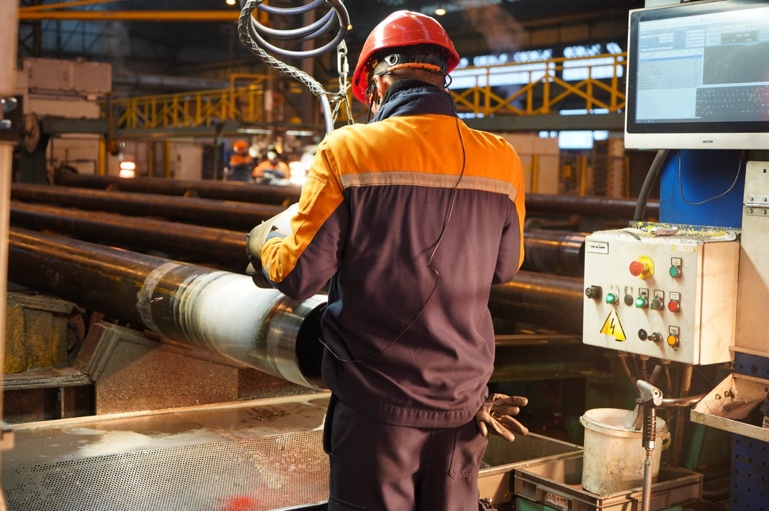
Quality control operation at Vallourec. The worker needs to report hundreds of measured values (image: Vallourec).
Dialogue must be built around real tasks, not around demo scenarios. The vocabulary must match the field, including professional terms, synonyms, units, references and procedural habits. Expert users need speed, while beginners may need guidance.
Questions for you:
- I have reports from field operations all the time Yes/No
- 100% of the reports from the field are complete Yes/No
- Workers never come back twice onsite Yes/No
- I am sure that field data are captured in real-time Yes/No
If you reply No more than 2 times,
then you need to do something.
REX 03: Offline should be treated as a priority
In operations, connectivity behaves like a little hungry ghost: it appears and disappears!
On many industrial sites, especially in constrained or secured environments, connectivity behaves like a little hungry ghost. It appears, disappears, then returns just long enough to make everyone feel uneasy. A tool that keeps working when the network vanishes is not less advanced than a cloud-dependent one. In field conditions, it may be the only version of advanced that deserves the name.
A system that depends on permanent connectivity may be “digital” in the office and useless in the field. Working offline is therefore a feature that should be treated as a human-factors requirement, not just as a technical characteristic.
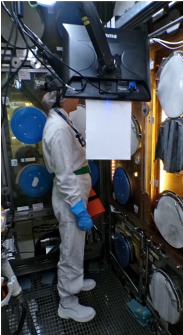
Offline design means the operator can continue the task without spending time fighting with the network. Data can be captured locally, then synchronized later, and mostly protected against loss. It’s up to the management to adapt to the constraints of the field to generate their Power-BI reports…
Process management for gloves-box workers in nuclear production plant: no cloud, no network, heavy gloves on and I the box. 100% availability and traceability are mandatory: error and data mismatch due to network issue is not an option!
image: Orano, SPIX
A serious REX question follows: what happens to the operator when the network fails?
| If the answer is “the operator waits”:the design is fragile. | When the answer becomes “the operator continues, the system stores, and synchronization happens later”:the digital tool finally starts to bring some value. |
Questions for your IT:
- Network is 100% available in the plant Yes/No
- Shared data are accessible everywhere Yes/No
- Workers know how to recover network glitches Yes/No
- Plants’ network manages big flux of real-time data Yes/No
If you reply No more than 1 time,
then you need to work differently.
REX 04: Screen is not always the safest place
In industrial work, the cost of screen attention can rise quickly!
In industrial work, attention is a limited resource. A screen asks for visual focus and often demands cognitive switching. That demand may be acceptable during preparation, review or post-intervention analysis; during field action, however, the cost can rise quickly.
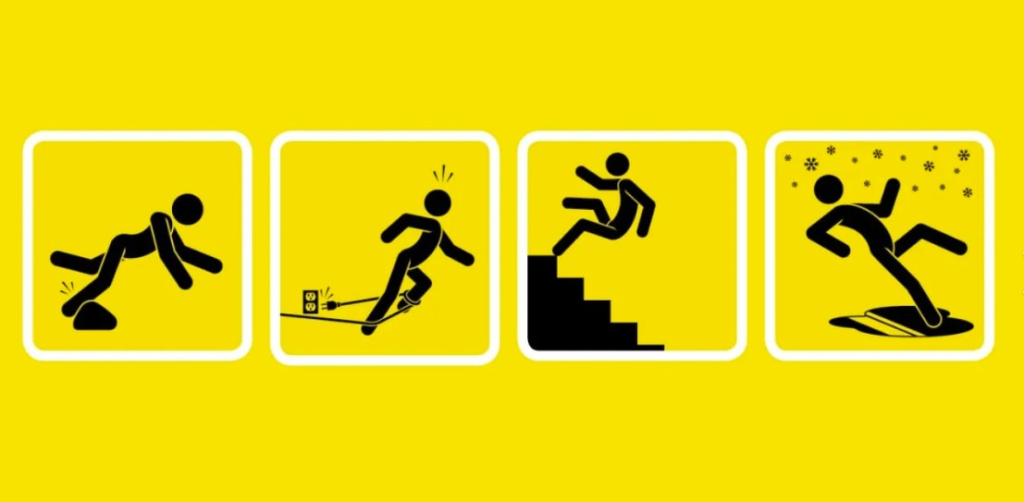
Image for same level fall prevention in industrial context. The 4 pictures illustrate the typical situations where the look at a screen can generate significant risk for fall at the same level [4].
Research on voice user interfaces in manufacturing logistics identifies hands-free and eyes-free interaction as an important benefit, because operators can interact with the system without monopolizing their hands or visual attention[5].
Is our solution ready to put “voice everywhere”?
A thousand times no, that would be lazy and possibly unbearable. The smarter choice is to map work moments by attention type. Some moments are suitable for screen-based review. Others are better handled through voice confirmation. A few should probably remain completely free of interaction because the operator needs full concentration.
For SPIX industrial voice assistance, the design work should therefore start with a simple classification:
Look-free moments: the operator can speak but should not look at a screen.
Hand-free moments: the operator can answer but should not manipulate a device.
Silent moments: the operator should not be disturbed by the assistant.
Review moments: the operator can safely check, correct or validate on screen.
Questions for you:
- Last year, we had an increase of small incidents Yes/No
- Site inspectors move a lot in the plant, with stairs Yes/No
- Workers complain about carrying a tablet onsite Yes/No
Smartphone screens are definitively too small Yes/No
If you reply Yes more than 2 times,
then you are ready for a NoScreen digital approach.
REX 05: A vocal checklist is not intelligent
A good voice interface does not add another object to manage – it changes the relationship between the operator and the digital system.
A literature review on voice user interfaces in manufacturing logistics identifies hands-free and eyes-free interaction as a major advantage, because hands are not required to operate the interface and the field of vision remains available[6]. In industrial work, it is the difference between attention staying on the task and attention being pulled toward a screen at the worst possible moment.
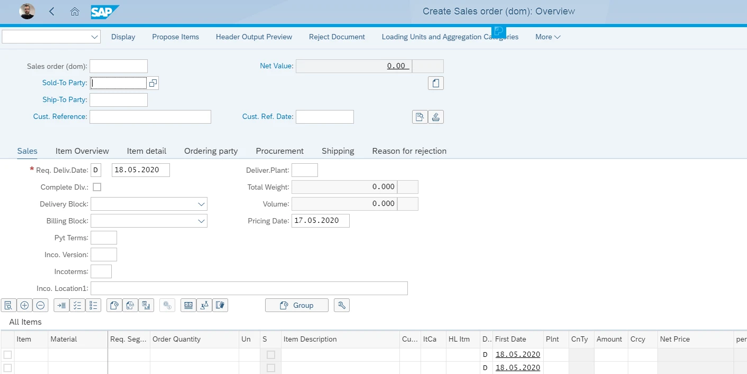
Sample SAP interface dedicated to quality control. One can realize how useless voice can be to complete such form, without a strong and robust dialog flow, adapted to the worker’s jobs and to such interface.(source web, nothing against SAP).
Have you ever notices how screens are greedy? They ask for eyes, hands, posture, precision and a lot of attention. They also ask for gloves to be frequently removed or adjusted so that a field operator can interact with a device which can be a violation of a safety protocol. Once again, conventional tools can push operators toward memorization and delayed reporting when the field environment makes real-time digital interaction impractical.
A good voice interface does not add another object to manage – it changes the relationship between the operator and the digital system. For an industrial voice assistant, that translates into several very concrete rules.
First, the system should speak the operator’s language, including business terms, equipment names, units, references and accepted synonyms.
Second, the assistant talking should be reduced to minimum. The attention of the user is already all over the place and he shouldn’t be concentrated on listening to dropdown lists.
Third, error recovery must be designed as normal behavior. The operator should be able to correct, repeat, cancel, skip, resume and ask for help without falling into conversational quicksand.
Fourth, the expert and beginner modes should not be cosmetic. An experienced operator may prefer shorter prompts and direct commands, while a novice may need guidance, reminders and explicit sequencing.
Questions for you:
- The more fields on the same page, the better Yes/No
- Hiring criteria in my company: small fingers Yes/No
- Once you need glasses: it’s retirement time for you Yes/No
- We can never go digital, forms are too complex Yes/No
If you reply Yes more than 1 time,
then it is urgent for you to move Voice First.
REX 06: Adoption is not only communication
Are the field operators resistant to change, or their digital tools badly fitted to their work?
When operators avoid a digital tool, the reflex is sometimes to say they are resistant to change. That explanation is comfortable, because it makes the user the problem.
A less flattering possibility is that the tool is badly fitted to the work. If the interface requires too much attention, fails in noisy conditions, misunderstands professional vocabulary, depends on network coverage, or slows down experienced users, adoption will not be solved by posters, training sessions or a motivational internal email titled “Let’s go digital together.”
The practical response is to test the assistant where the work bites.

As the fox finally adopts the boy[7], not only through advertising but with real mutual understanding and comprehension (image: Le Petit Prince)
Testing does not only consist in communicating about the tool, making its promotion. It is about working and improving together on the shopfloor. And, bear with me: testing should include PPE, background noise, time pressure, interruptions, poor connectivity, real terminology, ambiguous answers, and operators with different levels of experience (and different accents).
A good REX protocol could measure:
Completion rate of the procedure or report;
Number of corrections needed after the intervention;
Time spent interacting with the digital tool;
Perceived cognitive load;
Operator trust in the assistant;
Situations where the operator prefers screen, voice or no interaction;
Failure cases caused by noise, vocabulary, timing or workflow mismatch.
The point is to discover exactly where the voice is useful, where it is annoying, and where it should stay silent.
Questions for you:
- I move to the shopfloor at least once a week Yes/No
- Last year, I ran a “live my life” on the plant Yes/No
- Frequently, I take time talking with the guys Yes/No
- The last innovation comes from workers initiative Yes/No
If you reply No more than 2 times,
then you need to do something to restore confidence.
Practical design principles from the field
By now, the pattern is clear enough to start designing against it.
A field-compatible voice assistant should begin with the operator’s constraints rather than the software’s architecture. That means it should work when hands are occupied, when eyes must remain on the task, when gloves make touch interaction hazardous, and when the network decides to take some time off. It should help operators capture structured data while the situation is still fresh, without transforming every intervention into a memory competition.
The first practical principle is minimizing attention theft. Every prompt, confirmation and instruction should be judged by how much attention it removes from the task. A voice assistant that constantly interrupts is not safer than a screen, it is simply another way to be distracted.
The second principle is designing for degraded conditions first. Noise, offline mode, PPE, stress, repetition and fatigue should not be edge cases – in industrial environments, they are often the normal plot.
The third principle is making the dialogue operational, not conversational. The goal is not to create a charming personality, because the operator rarely needs a banter while inspecting a valve. They need clear prompts, reliable recognition, error correction and steady progression.
The fourth principle is separating guidance from control. Beginners need scaffolding, while experts need speed. A single rigid dialogue will frustrate one group or endanger the other by encouraging workarounds.
The fifth principle is testing the system in its environment. The edge cases are the principal cases in the industrial context. That may be the least glamorous and most important step of the process.
A less theatrical digital future
A good digital system should understand that the operator is not sitting in ideal conditions, waiting for a beautiful interface to complete their existence. The operator is working inside a physical, noisy, constrained, sometimes hazardous environment where attention has value and needs to be protected.
Smart Voice Assistant from SPIX industry is interesting because it approaches the digital landscape from the field side: hands-free interaction, offline capability, guided reporting, connection to operational tools, and a voice-first approach designed for people who cannot spend their intervention caressing a touchscreen.
If we want to build tools for humans, SPIX will start by looking at the human situation in which the tool will exist. Because that is where the human belongs in the digital landscape: not as a slogan or a helmet-shaped icon in a slide deck, but as the starting point of the design.
About
SPIX industry develops the first Voice-AI solutions 100% dedicated to industry. The Spix intelligent voice assistant is operational under industrial conditions of use. With the introduction of the voice, SPIX industry puts men and women back at the heart of industrial production with assistants specialized in the voice guidance of operators, measurement reading, quality control, and in the real-time structuring of their technical and knowledge feedback.
Point of contact
André JOLY – Managing Director
Tel.: +33 (0)6 25 17 27 94
Email: andre.joly (at) spix-industry.com
Legal entity
Website: spix-industry.com
Linkedin: linkedin.com/company/spix-industry
Simsoft3D SAS – 40 rue du Village d’Entreprises – 31670 Labège (France)
“Voice Experience “, ” SPIX ” and ” SPIX industry ” are registered trademarks of Simsoft3D SAS.
[1] https://www.iaea.org/newscenter/news/new-crp-deployment-of-innovative-digital-technologies-for-efficient-decommissioning-of-nuclear-facilities-dedicate
[2] https://www.nist.gov/itl/iad/human-centered-technologies/human-factors-human-centered-design
[3] https://www.spix-industry.com/forgetting-curve-traceability-and-the-industry/?lang=en
[4] https://www.spix-industry.com/spix-supports-companies-qse-approach/?lang=en
[5] https://link.springer.com/article/10.1007/s10772-023-10036-x
[6] https://link.springer.com/article/10.1007/s10772-023-10036-x
[7] From the book : « Le petit prince » from Antoine de Saint Exupéry
